

Overview
In brief:
- Many types of businesses in the U.S. – LLCs, corporations, partnerships, and nonprofits – are required by law to register with state governments (and federal and/or local governments, in some cases)
- Companies are required to verify the businesses they plan to onboard, should make sure they are representing themselves truthfully, and check that the business is legally allowed to operate in the U.S.
- Business registration documents and information can most often be found at state Secretary of State offices, from the SEC, or by using automated third-party tools like Middesk
When checking a U.S. business for authenticity and risk during B2B client or partner onboarding, a simple but important question to ask is: is the business registered with the Secretary of State (SOS) office, and legally allowed to operate in the U.S.?
When performing Know Your Business (KYB) checks before onboarding a business, knowing how to search for and verify their business registration information is typically the first step. This typically gives you insight into their name, address, EIN/TIN, and other things that are quick to verify to weed out businesses that weren’t providing accurate information in their application to onboard onto your platform.
This information helps you assess the risk of onboarding the business, because your KYB program rules will flag businesses that raise red flags when you check this information against what they provided you.
Let’s start with what a business registration lookup is and how it works.
What is a business registration lookup?
A business registration lookup is a search for documentation that proves a business is formally registered with federal, state, or local governments. It involves searching available databases like the Secretary of State (SOS) office for each state to find the business, and then extracting data from the database for review.
In the U.S., any corporation, LLC, nonprofit, or partnership must register with government agencies, and provide at least basic information about their business name, address, and the people associated with the business.
Looking up business registration information is critical for determining if a business is legitimate and finding out who owns a business, both very important and early steps of a KYB verification process.
What kind of information can you retrieve with a business registration lookup?
The information you can access varies by state, as each state has its own SOS database, interface, and parameters for searching. Typically you can retrieve at least this information:
- Business name
- Business address
- Director or people associated with the business
- Business EIN / TIN
- Formation documents
Some SOS databases may include some additional information, but typically you would need a dedicated business identity search tool to find additional business identity information like this:
- Other “Doing Business As” names or common variations on their name
- Liens, litigations, and bankruptcy status
- Watchlist, Sanctions Lists, PEPs, and RCAs
- Industry Classification and high-risk industry flagging
What information inputs do you need to do a business registration lookup?
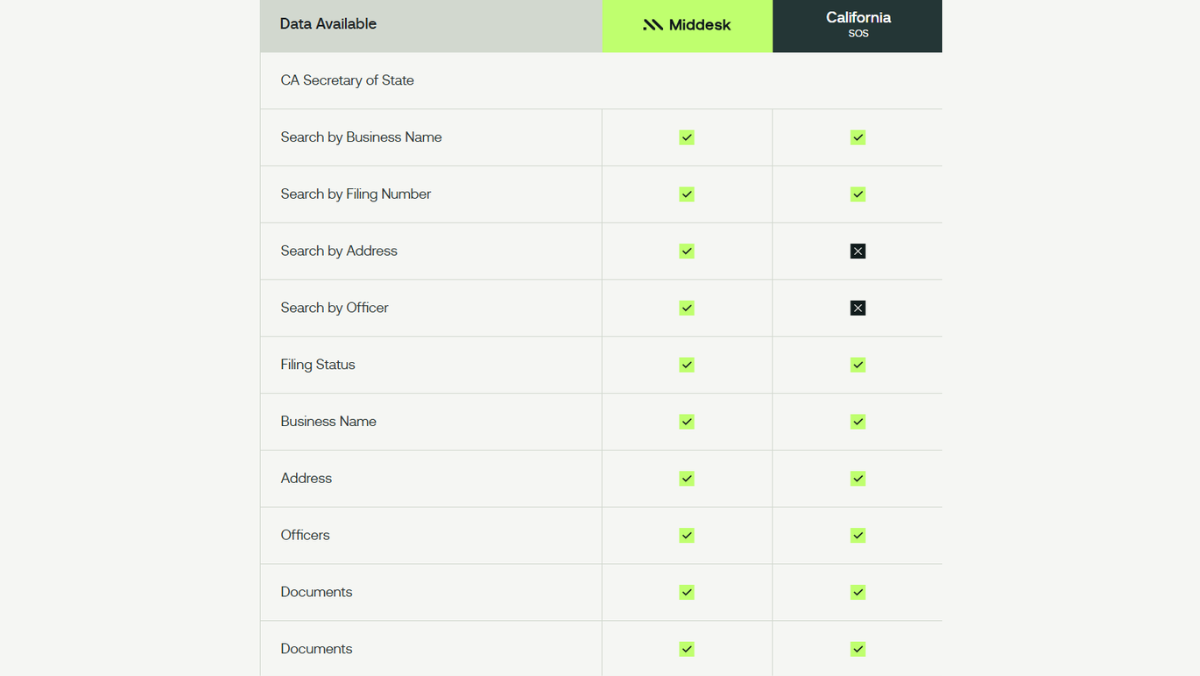
This varies by each state, because the interface for each SOS database is different, and allows you to search by different parameters. The most common input you can use is the business name or address, but often the SOS database will not be set up to match based on a similar name, or a “Doing Business As” name like an SOS business search software would be.
Look at the difference here between the information you can search by using Middesk’s Business Verification tools compared to the manual SOS search for California, where you can’t search by Address or by Officer:
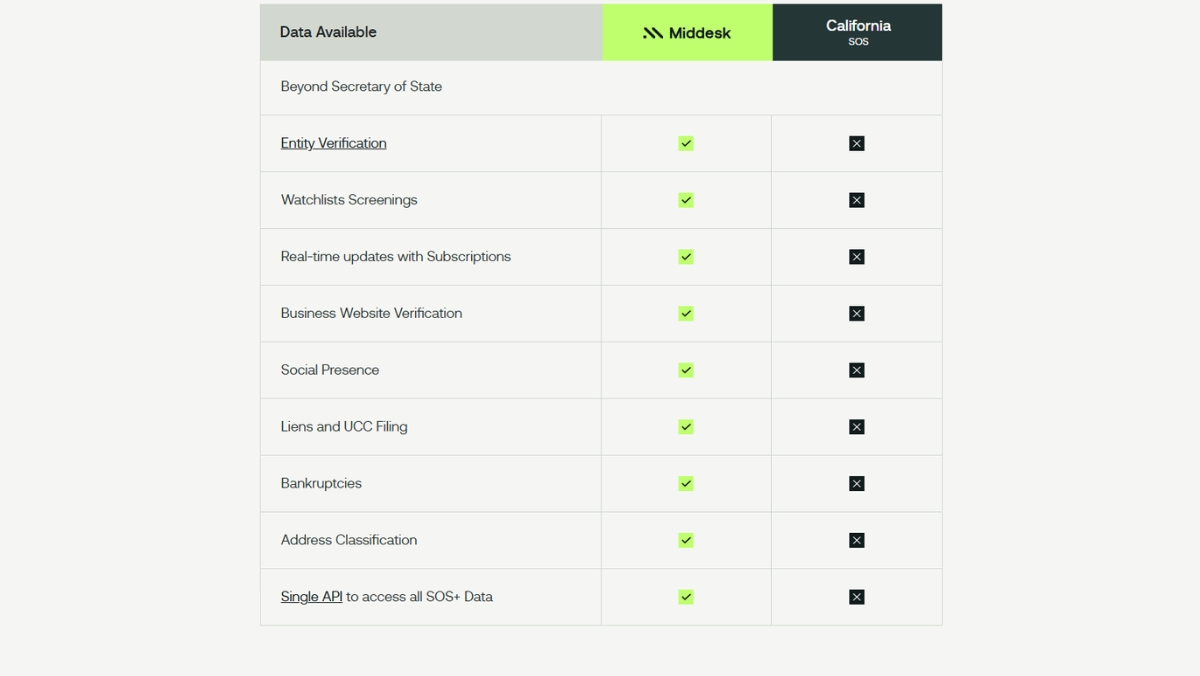
 And the difference between what information you can retrieve with Middesk compared to what’s available in the California state SOS database:
Why a business registration lookup is important for business verification
A business registration search for KYB verification serves two main purposes: it helps you verify the business’s identity, and it helps you assess the risk of onboarding them as a customer. Here are the main reasons businesses do registration lookups and verification:
Adheres to regulatory compliance and avoids legal liability
Registration with state (and sometimes federal or local) governments is a legal requirement for many types of businesses in the U.S. Checking that a business is registered helps to determine that it actually is a business, and that it’s legally authorized to operate where it’s located.
Where Risk & Compliance Comes In: It is your legal responsibility not to associate with illegitimate businesses, per the Bank Secrecy Act of 1970, the AML Act of 2020, the 2001 USA PATRIOT Act, and other U.S. financial regulations.
Did you know? Want to deep dive into some of these regulations and what your legal responsibilities are? Check out our guides on the Bank Secrecy Act, and the AML Act of 2020 & New CFT Regulations.
Determines if the business was truthful in their onboarding application
Business registration information is typically made up of some core business identity information like the business name, address, people associated with the business, and contains EINs/TINs that were assigned by the state. When a business is applying with you, you collect this information from them, and then check what they provided against these authoritative databases.
This helps you determine early if the business was providing accurate information. One of the most common business identity fraud scams occurs because fraudsters gain access to real EINs/TINs (which pass some screening processes), but they won’t have the correct name or address associated with that business. A check of all of this information against what they provided will identify when false application information was provided to you.
Where Risk & Compliance Comes In: When information provided by the business during onboarding doesn’t match what’s in the SOS Articles of Incorporation that you retrieve, this should be a top-of funnel immediate red flag that triggers Enhanced Due Diligence (EDD) before proceeding with this customer.
Business identity information is a key aspect of perpetual / ongoing KYB compliance
Collecting and verifying business identity information while onboarding prevents you from working with illegitimate businesses, but what happens when a business later loses their registration status, has liens filed against them, or does something that would exclude them from your platform — but they’re already on it?
Ongoing compliance (sometimes called perpetual KYB or ongoing monitoring) is also important, which involves checking and rechecking business registration information on a regular cadence to ensure you identify any changes to the status of a business. Continuing to check the SOS databases for registration information is an absolutely essential component of perpetual KYB.
Where Risk & Compliance Comes In: Checking that a business is in good standing with the IRS helps you limit your risk when onboarding them.
Confirms the business’s financial capabilities
Knowing that a business you’re onboarding is registered means verifying that it’s able to perform commercial financial functions — like open business bank accounts, apply for business loans, and receive capital investments.
Where Risk & Compliance Comes In: Checking that a business is in good standing with the IRS helps you limit your risk when onboarding them.
3 methods to do a business registration number lookup
There are three ways to do a business registration lookup in U.S.: Manually searching the Secretary of State database for the state the business is registered in, using the SEC’s EDGAR system for publicly traded companies, or using a dedicated business registration and verification search software like Middesk.
Here are detailed steps for how to do a business registration number lookup using each method:
1. Manual and individual search of the State Secretary of State office
You can look for the individual state’s SOS database by searching for it, and then enter the business information you have into their search portal. Then review the results to look for a match for the business you are looking for, and export and review the information the SOS portal returns. Here’s an example of California’s SOS database:
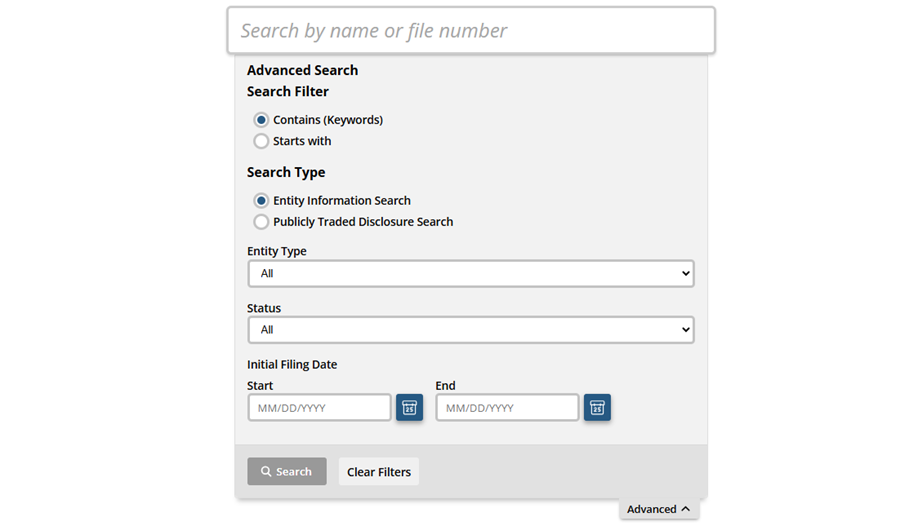 Image Source: California SOS Business Search Database
This method has its share of challenges for business registration lookups:
- You have to search each state’s SOS database individually
- You have to search for each business you are trying to verify one at a time
- You have to know which state the business is locations in before you search so you use the correct SOS database
- Some SOS databases charge a per fee search
- Some SOS databases require account registrations and you must be signed in before you conduct the search
- If your potential customer provided you incorrect information by mistake, you won’t be able to find them, so the SOS databases don’t return close matches
- The interface for each SOS database is different, so the person on your team who does these searches would need to learn how to use all 50
- Human errors from the person doing these manual searches might create false positive red flags in your KYB process
- There is no way to automate these searches — they are each done manually
- Periodically reviewing this information for ongoing compliance isn’t sustainable when done in this manual way
2. SEC’s EDGAR system
The Security and Exchange Commission (SEC) Electronic Data Gathering, Analysis, and Retrieval (EDGAR) system is another place you might be able to do a business registration number search. You can search company filings by company name or ticker abbreviation, CIK number (Central Index Key, a unique identifier for a business in the SEC’s database), associated individuals’ names, or keywords.
A plus of the EDGAR method for business registration number lookups is that it’s not limited to one state, but it has a couple of drawbacks as well:
- This method is still overly manual, as you have to search businesses one by one
- It only works for big businesses that are listed in the public stock exchanges
- Small businesses, contractors, sole proprietors, and partnerships won’t be findable using this search method
- EDGAR records only go back to 2001
- It still doesn’t provide close matches if information doesn’t match exactly
- Ongoing compliance checks isn’t sustainable using this method either
3. Automated SOS business search software like Middesk
We built an automated SOS business search tool that can search the SOS databases for all 50 states at once, not only matching the basic information you need from a business registration information lookup, but other critical business identity information that is useful in KYB risk scoring. In Middesk, it’s as easy as having 2 inputs: business name and address:
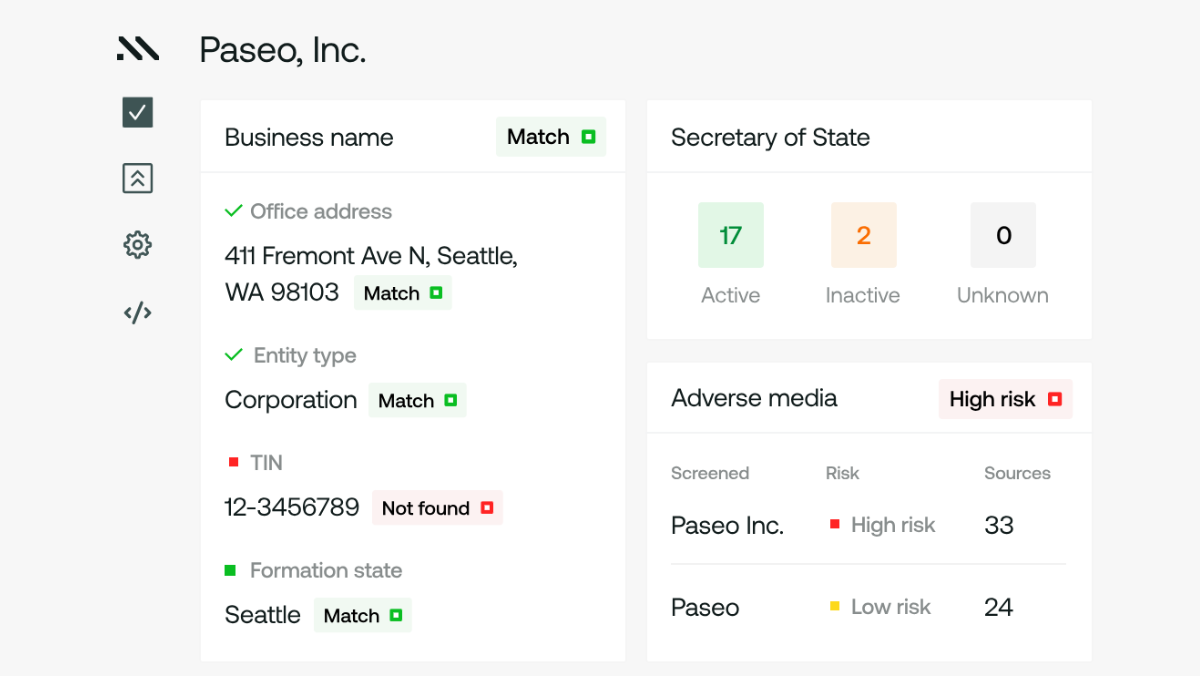
Doing these searches manually is not sustainable for growing businesses, and our SOS API works at scale to retrieve and verify this information for you in minutes.
Find and verify business registration information for KYB faster with Middesk
Knowing a U.S. business is registered and legally operating in the U.S. is a critical piece of B2B onboarding information to maintain compliance. But extending your reach into the information you verify about a business outside of just legal registration status can significantly improve your KYB risk assessment capabilities — making sure you weed out nefarious businesses at the top of your onboarding funnel.
Middesk Verify searches all 50 SOS offices for business registration data, but it doesn’t stop there. It also returns other essential business identity information, including key risk assessment data points like:
- Business EIN / TINs
- Business addresses and “Doing Business As” or legally operating business names
- UBOs, directors, people associated with the business, and RCAs
- PEP, OFAC, SDN List, Sanctions List, and other Watchlist hits
- Industry classification and high-risk industry flagging
- Liens, litigations, and bankruptcy data
- Adverse Media, web presence, and online footprint
Get in touch with our sales team and book a demo to discover how Middesk can help you automate — and elevate — your KYB onboarding procedures.